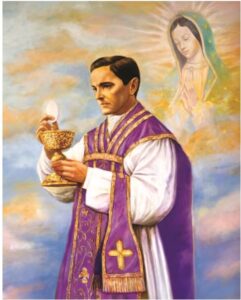
God, our Father, protector of the poor and defender of the widow and orphan,
you called your priest, Blessed Michael McGivney,
to be an apostle of Christian family life and to lead the young to the generous service of their neighbor.
Through the example of his life and virtue, may we follow your Son, Jesus Christ, more closely, fulfilling his commandment of charity and building up his Body which is the Church.
Let the inspiration of your servant prompt us to greater confidence in your love so that we may continue his work of caring for the needy and the outcast. We humbly ask that you glorify
Blessed Michael McGivney on earth according to the design of your holy will. Through his intercession, grant the favor I now present (here make your request).
If you are afraid to use the website because you are afraid to do something that might damage our website "be not afraid" jp2. The website cannot be damaged by things you do. Feel free to try everything available. Nothing can be deleted nor users removed by anyone other than the Administrator. All options that are available to you cannot harm anything. If you see or experience something odd you can report it to the webmaster. The option to do this is at the bottom of most pages.
faithbook
A new option now appears on your menu. This is called "faithbook" which navigates you to a new social style area of the website. The vision for this faith-based social area is to be able to invite your wives, children, and friends to join in our faith experiences within the council with a full featured social activity board away from our members working area (main site). My vision is when a new person that's not a member wants to join our site, the administrator will vet them assigning them the roll of "family, friends" which gives them a very limited access to the member site. When they sign in, they are directed to faithbook automatically. The activity on this site does not get exposed to the outside world. It's totally internal.
I have developed a Logo for this section:
It is my recommendation that this logo be registered with Copyright.gov. $45.00 Discussions are invited.
This write up assumes you do not have a licensed product of Adobe installed as the features for form-fill and e-signature are included when dealing with their .pdf documents. Adobe's business plan has changed and they are now charging for these services and diminishing print resolutions if you use an unlicensed free Adobe Reader. We have paid for PDFescape at 1/2 the cost which is licensed to one user so we have to be creative using it. You must be a registered member to use this feature so if you have not done this step cut and past or click this link to learn how: https://kofcvt.org/webmaster-news/.
Sign In and navigate to the Member Tab and click the ∨ and more options appear below. Find Annual Survey and select. From mobile devices, this option is on the left Menu2 option under Members. The Annual Survey Page is designed so you can print or create a .pdf file or email the blank copy to where ever. The brown colored button above labeled Auto [Fill With PDFescape] will guide you how to proceed with signing in to the product and creating your document to fill out. The following is the pop-up dialog.
Filling in the Annual Survey On-Line
If you wish to fill out the Annual Survey On-Line, click the Auto Fill with PDFescape button. After PDFescape launches, you are asked to login. Enter: User Name sbknights7525@gmail.com Password: Survey2021! check I'm not a robot and then press the Login button
PDFescape allows you to view recent documents. Click the Review option. You should see a list of Annual Surveys. Look for document "individual_survey1728a_p".
Duplicate this by pressing the duplicate icon on the left. Then use the pencil on the right to change the name of your new document to be "Rick Gravelin 2021 Annual Survey " or use your Member Number instead of your name. Then click on the document name to open it to edit. When you are done, look for Recent in the header options. This will send you back to the list.
After you are finished filling out the survey numbers, look to the left side options to Save your document. Also, there are options for you so you can save your document, save & download pdf, and print your document.
The below photo gallery shows you the screens.
There is no album selected or the gallery was deleted.